



Description
Download Norton Security Deluxe – PC Protection, Virus Scanner, Cybersecurity Tool
Overview
Norton Security Deluxe is a comprehensive security solution designed for Windows users seeking robust defense against evolving cyber threats. The app functions as a full-featured antivirus and internet security suite, safeguarding personal computers from malware, spyware, ransomware, and other digital dangers. Its primary purpose is to protect users during everyday digital activities such as web browsing, email communication, and file sharing, ensuring a secure and uninterrupted computing experience.
Target users include home users, remote workers, and individuals who prioritize data privacy and system integrity. The app addresses common concerns like unauthorized access, data theft, and system slowdowns caused by malicious software. By offering real-time threat detection and proactive defense mechanisms, Norton Security Deluxe helps prevent breaches before they occur, reducing the risk of identity theft and financial loss.
Developed by Symantec, a well-established name in cybersecurity, the app benefits from years of industry expertise and threat intelligence. Although specific technical details about the underlying engine or detection algorithms were not provided, the app’s focus on automatic updates and real-time protection suggests a commitment to staying ahead of emerging threats. In the broader app ecosystem, Norton Security Deluxe serves as a critical utility for maintaining digital safety in an increasingly connected world.
Key Features & Functionality
- Real-Time Threat Protection – Monitors system activity continuously to detect and block viruses, spyware, and ransomware as they attempt to infiltrate the system. This feature is especially useful during high-risk activities like downloading files from unknown sources or visiting unverified websites.
- Advanced Online Protection – Utilizes cloud-based intelligence and heuristic analysis to identify new and unknown threats. This ensures that even zero-day attacks are met with immediate defensive responses, minimizing exposure.
- Secure Communication and File Sharing – Scans emails, attachments, and shared files for malicious content before they are opened. This feature is ideal for users who frequently exchange documents or messages across platforms, reducing the risk of infection through trusted channels.
- Automatic Updates – Ensures the virus definitions and protection engine are always current without requiring manual intervention. This maintains consistent security levels as new threats emerge daily.
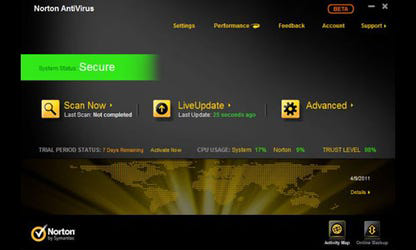
- Intuitive User Interface – Offers a clean, accessible dashboard that simplifies navigation for users of all technical skill levels. Settings can be adjusted easily, and security status is clearly displayed at a glance.
- Free Customer Support – Subscribers receive access to dedicated support services during their subscription period, providing assistance with configuration, troubleshooting, and security concerns.
These features collectively create a layered defense strategy. For example, a user downloading a software installer from a third-party site benefits from real-time scanning and automatic updates, while someone sending sensitive documents via email gains confidence from file content verification.
Interface, UX & Performance
The user interface of Norton Security Deluxe is designed with clarity and accessibility in mind. The main dashboard presents a centralized view of system health, including active protection status, recent scan results, and threat history. Navigation is structured through clearly labeled menus and icons, allowing users to quickly access core functions like manual scans, firewall settings, and privacy tools.
Visual design emphasizes functionality over ornamentation, using a consistent color scheme and hierarchical layout to guide user attention. The app avoids clutter, ensuring that critical alerts and actions are prominently displayed without overwhelming the user. This approach supports efficient decision-making, particularly during high-pressure situations like detecting an active threat.
Although the developer did not list formal performance metrics, the app is described as delivering fast protection, suggesting optimized resource usage. It is expected to operate efficiently across a range of Windows devices, from entry-level laptops to high-performance desktops. Responsiveness appears to be prioritized, with minimal lag during scans or updates. Stability is likely maintained through regular maintenance cycles, though specific crash reports or error logs were not disclosed.
Platform Compatibility & Technical Requirements
Norton Security Deluxe is available exclusively for the Windows platform. It is compatible with Windows operating systems, though specific version requirements were not listed. The app has a file size of 1.2 GB, indicating a full-featured installation with multiple security components, including real-time scanning engines, firewall modules, and update services.
Given its size and function, the app likely requires a modern Windows system with sufficient RAM and disk space to operate effectively. However, the developer did not specify minimum OS requirements, hardware specifications, or compatibility with older Windows versions. Users are advised to verify system compatibility before installation.
Pros and Cons
- Comprehensive protection against viruses, spyware, and ransomware
- Real-time threat detection with cloud-powered intelligence
- Automatic updates ensure ongoing protection
- Intuitive interface suitable for non-technical users
- Free customer support during subscription period
- Secure handling of communications and file sharing
- Price point may be high for casual users
- File size of 1.2 GB may impact storage on low-capacity devices
- Compatibility with older Windows versions not confirmed
- No information on background resource usage (CPU/RAM)
- Support limited to subscription period
FAQ
Is Norton Security Deluxe safe to install on my Windows PC?
Yes, Norton Security Deluxe is a legitimate security application developed by Symantec. It is designed to protect your system and does not contain malicious components.
Can I use Norton Security Deluxe on multiple devices?
While the app is designed for Windows, the developer did not specify whether the license covers multiple devices. Users should refer to the official licensing terms for details.
How often does the app update its virus definitions?
Norton Security Deluxe updates automatically to ensure the latest threat definitions are always in place, minimizing gaps in protection.
Is customer support available after my subscription ends?
Free customer support is included only during the active subscription period. After expiration, support access may be limited or require a renewed subscription.
Does Norton Security Deluxe slow down my computer?
The app is designed for fast performance, but its impact on system speed may vary depending on device specifications. The developer did not provide detailed information on resource usage.
Final Thoughts
Norton Security Deluxe stands out as a powerful and reliable security solution for Windows users concerned about digital safety. With its robust threat protection, real-time scanning, and user-friendly interface, it offers peace of mind in an era of constant cyber risks. The inclusion of automatic updates and free support enhances its value, making it a practical choice for both novice and experienced users.
While the price and file size may be considerations for some, the comprehensive feature set justifies the investment for those who prioritize security. Whether you're managing personal data or working remotely, Norton Security Deluxe delivers a strong defense against modern threats.
Download Norton Security Deluxe now
Guides & Tutorials for Norton Security Deluxe
How to install Norton Security Deluxe
- Click the Preview / Download button above.
- Once redirected, accept the terms and click Install.
- Wait for the Norton Security Deluxe download to finish on your device.
How to use Norton Security Deluxe
This software is primarily used for its core features described above. Open the app after installation to explore its capabilities.
User Reviews for Norton Security Deluxe 0
No reviews found


